Wes Montgomery, legendary jazz guitarist, and master of the Octave.
An Octave is basically the same note played 8 tones higher or lower from where you are currently on the fretboard. When both notes are played at the same time, it can make a smooth Jazzy sound, or with overdrive, a really cool heavy metal sound.
If you are playing Octaves on Guitar using a pick, then you have to use some of your fingers to mute the strings in between. Depending on the shape you are doing, there might be one or two strings that require muting.
Here are the Octave forms that can be made on the guitar fret board:
One string in between (use a finger to mute this inbetween string) :
Two strings in between Octave forms:
Here are some great videos from the web about playing Octaves on Guitar.
This first video is from "Dolphin Street" and gives a really good overview of Octaves:
Here is an example of how to use Octaves in heavy metal guitar:
Here is an excellent 11 minute video about Octaves for Soloing in the Wes Montgomery style:
There are also electronic effects units designed to play octaved sounds automatically. These are called “octavers”. What a digital octaver does is take the note you play, process it and repeat it an octave higher or lower, depending on the setting. Combined with a compressor/sustainer pedal, you can get a really cool jazzy sound.
The cool thing is that you can play octaved sounds using only one string; and create really high octaves on the top E string.
These units are good fun, but it is much more powerful and versatile to be able to pick up a guitar and just play Octaves manually, and intersperse them in between other notes and chords.
Enjoy, Big Passy Wasabi
P.S. And that my friends was the 100th Blog Post for PWOICT !!!
Yes.. that was a bit of work, but a lot of fun.
(Remember to do our "once click" Survey at the top of the page).
Songsterr ( http://www.songsterr.com/ ) is a website offering the extraordinary online experience of hearing, playing, practicing, and learning guitar, bass, and singing. Songsterr provides a realistic guitar sound and gives you a full control over the playback - you can play at half speed, as well as repeatedly looping through sections until you can play them correctly.
When I first used it, it was allowing me to use the full set of functions including half-speed, looping, and printing. However after a week or so this free trial has cut out, and I can only use the player. I am not sure how this has happened, as I never signed up for a free trail. Maybe they enabled a free trial automatically by referencing my IP address each time I logged on. All I know is that it was significantly better being able to access this full functionality.
Here is a list of the functions, (which I no longer have), as they are only active for payed accounts (current charge is $9.90 U.S. per month):
The other strange thing about Songsterr is that it has an amazingly large library of Tabs, yet there does not seem to be very much information about it on the Internet. Maybe it is relatively new, or perhaps because we have to pay for most of its useful functions, it is not all that popular ?
The Songsterr Player provides drums, bass, all guitar parts (Note that lyrics and Vocals are not displayed, unless you go into the Mixer function and click them on).
Songsterr is actually many Tabs rolled into one. To isolate the Tab we want, we use "the mixer", where we can choose which Tab we wish to view.
Eg. Here is what the mixer setup for the Oasis song "Wonderwall" :
In the mixer we can choose to mute various instruments, we can also select which tab we want to display. In the pay version we can also adjust instrument volumes.
Here are example mixer selections from Songsterr's tab of Oasis "Wonderwall":
So we could in fact use Songsterr for learning Guitar or Bass or just for practicing Singing, and learning the vocals for lots of songs.
The only thing in the player I would like, is to have the options for the lyrics to display with any tab, because I usually keep track of where I am in a song by singing or listening to the words.
Here is a YouTube 4minutes 30 seconds video on how to use Songsterr:
Here is a 30 second YouTube video that demonstrates the Songsterr Half Speed function:
And finally a 2 minute YouTUbe video that shows Sonsterr playing Stairway to Heaven, and a few other songs:
I am still deciding whether or not to get pay Songsterr for a month, overlapping with some holidays, and do some intensive song learning. The alternative is to have a printed free tab from somewhere like 911 Tabs, and just use the Songsterr player to help learn the song off the 911 printed tab.
Nonetheless, Songsterr is certainly a very impressive use of Adobe Flash to make an extremely flexible and fully functional online tab player.
"Rock House Method" provides instructional DVDs on how to play Guitar, Bass, Drums, and Keyboards.
I have used some of the "Rock Guitar" and "House of Blues" DVD videos by John McCarthy and found them to be excellent. John is a great enthusiastic presenter, who explains concepts really well, and each DVD also has a course booklet with tabs and additional information for the lessons.
Here is a You Tube video of one of John Mc Carthy's typical lessons:
You can ask your local music shop to order the DVD's in for you here in Australia, but I found that it can take weeks for them to arrive. Second time around, I have found it far better to buy my DVDs online from the American "Amazon.com" site.
Note that there are DVD's for Bass, Drums, Keyboards, and Vocals, (by an array of presenters) as well as John's own guitar DVDs.
So if you like what you have seen and heard, then why not buy a couple of John's DVDs and enhance your own Rock playing methods.
Image Source: www.magix.com Magix Music Maker 15 is a multitrack sound loops music workstation. For around $50 on eBay it is an absolute bargain, and a great entry level music making package. The software comes with great quality samples of drums, guitars, bass, keyboards, percussion, sound fx, Vocals, as well as a full set of effects processors.
It has a really well set out drag and drop interface, as shown here with 4 of up to 16 tracks of sounds that can be assembled while building a song:
If we want to see the whole song at once, then we can click the Overview tab:
The sounds are grouped into "Soundpools" of various genres, that can then be previewed, and dragged onto the recording timeline. Additional sounds and soundpools can be purchased online, or you can find and import your own .wav sounds into MMM 15 to use as well. There is also facility to record external sound by using a microphone plugged into your computer's sound card.
There are also lots of effects that can be applied to each sound loop that we add onto the timeline. These are just some of the items, there are also guitar distortion, compressor, chorus, and delay pedals.
There is even a Vocoder included, which we used to add some background vocals on a techno song we made.
Here is an Alternative Rock Song that we made at Passy World using MMM 15, and the set of sound loops that came with it: (My 10 year old son actually made most of this song, and I just added some extra guitar into it).
Image Source: www.magix.com
Here is part of a Techno Song that was made at Passy World using MMM 15:
Image Source: http://www.redbubble.com/people/leonardo/art/1645217-2-techno (Copy of Image has been purchased by Passy at redbubble site on 1/11/09)
Finally, here is a Reggae Song we made, using some MMM samples that we purchased for around $5 and downloaded from "Catooh":
There is probably the usual free 30 day download trial version available at this site that you can try out for free.
The version we use at Passy World is the standard MM15 shown below:
Magix MM 15 is a great way to learn about the structure of songs, how to assemble instrument parts together, and apply production effects. It is easy to use, and really good fun. Best of all it is quite cheap to buy compared with more sophisticated music software such as Sony Acid and Abelton.
It is also great for making simple drum, bass, and rythm guitar tracks to play along with and practice guitar.
So give it a go and get those big beats blasting out.
Both 911 Tabs and Guitare Tab sometimes have links where we can listen to the Song we are getting the Tab for.
However, we did not have much luck getting the Guitare songs to play. The play link seems to go to a site called "Blastro" but then the songs did not come up. Maybe I was unlucky and picked the wrong songs to try out ? And for 911 Tabs, not all of the songs have this "listen to" function.
But Guitare Tab! did have the tablature for the whole Beatles Magical Mystery Tour album, all in one long web page, which was interesting.
In 911 tabs we can search on Band Name, as well as Song Name. So we can just look for AC/DC songs if we wanted to.
So let's say we are interested in getting the Guitar Tab for Carlos Santana's version of the song: "Black Magic Woman". If we search 911Tab on song name, we soon obtain plenty of tabs, in fact we first get groups of Tabs and have to choose which group to navigate to:
So we picked the first group of 110 tabs, and then clicked. A t the next level down we get tabs that are rated, and we usually choose one of the top of list highly rated tabs.
Note that some of the tabs are "Guitar Pro" or "Power Tab" tabs. These require software to be on your computer to use the tab. "Power Tab" is free and you can find information on how to download and use it at our previous post at: http://tinyurl.com/PassyPowerTab .
Guitar Pro is not free, and costs around $ US 60 to buy and download online.
Since we are only after some basic tabulature here, we will choose one of the higer rated plain guitar tabs, such as the one from "Ultimate Guitar Tabs" and we then get a plain tab like this:
with Tablature for Solos included as well:
It is usually worth checking out more than one tab, because sometimes the other tabs supply us some additional information, such as extra chords and guitar riffs to use.
If we just want to have a copy of the words to the song, then the "Lyrics Mode" site at: http://www.lyricsmode.com/ is great for this:
and a search using song name of "Black Magic Woman" soon gets us what we need:
And last but not least, it is always great to have a look and listen to somebody else playing the song when learning any new tune on the guitar. And there is no better place for this than YouTube.com :
So 911Tabs: a strange kind of name to be sayin', but full of great tabs to be playin' :)
Okay then, let's look at how some of these great guitar pedals work.
Shown above are some basic "sinusoidal" shaped sound waves. Our ear detects these when music is played. Various "Guitar Pedals" or "Stomp Boxes" can be used to modify these basic sound waves to create new and interesting sounds.
The mathematics of sinusoidal shaped waves involves the trigonometry of right angled triangles. This is illustrated very nicely by the following diagram: (Copyright Russell Kightley - www.rkm.com.au - used with permission)
Russell also has a brilliant animation of the sine wave being generated, as the radius of a circle is moved in a manner which continually alters the sine value of the angle. (it also cleverly illustrates Cosine at the same time).
Russell also has many other amazing animations and images at his website: http://www.rkm.com.au (Check it out, especially the scientific drawings of influenza viruses).
In this post we will look at "Chorus" and "Distortion", and how the mathematics of wave re-shaping works for these two sound effects.
Chorus Effect
If we add in extra sound waves that are of similar shapes, all around the original sound wave, then we create the classic guitar “CHORUS” sound effect. This makes things sound like more than one guitar is playing and is often said to fill out and "color" the sound. In the world of guitar effects chorus makes one guitar sound like multiple guitars playing the same thing in unison. Just as each singer in a chorus would have different voices that blend, a chorus effect for a guitar will sound like different guitars all playing together.
This is demonstrated in the two sound samples below.
Press the play button of the mini-player on each one to hear the guitar play, both with and without Chorus effect applied.
Distortion Effect
Distorted Heavy guitar sound occurs when smooth Sine Waves are mathematically transformed into Square shaped, Sawtooth, and Triangle shaped waves. This is shown in the animation below:
Basic Distortion effect is demonstrated in the two sound samples below.
Press the play button of the mini-player on each one to hear the guitar play, both with and without Distortion effect applied.
The sounds in this post were made using "Magix Music Maker 15".
Magix Music Maker is only about $50 AUD to buy on eBay and is a marvelous set of sound loops and song making software that is so nice and easy to use. We will be doing a full review of MM15 in an upcoming post.
But in the meantime, get into stomping on those pedals, and make a myriad of marvelous sounds with your guitar. I know that's what I'll be doing this week :)
The above music is the classic ZZ Top "La Grange" Riff. It was created using an online editor, by typing in the guitar tabulature to generate the standard notation.
"Power Tab" Editor is a Free tablature authoring tool for Windows. It can be used to create guitar sheet music, more commonly known to musicians as guitar tablature and bass tablature.(eg. guitar tab / bass tab).
The program provides the most commonly used symbols in tablature, including chord names, chord diagrams, rhythm slashes, bends, slides, hammer-ons, pull-offs, harmonics and palm muting. It also outputs normal music notation as well.
It is a great piece of software for people who want to learn how to play guitar, and for experienced guitarists who want to transcribe their own music and/or guitar lessons. The software can be used by both acoustic and electric guitar players alike.
Note that it appears that due to legal action, the archive of Guitar Tabs at this website has been closed. So we cannot obtain input files for the editor at this site. (But don't worry there are other sites that have Power Tabs to download - see later in this post for details.
But at the Power Tab site we can click on Downloads and get a copy of the editor software installed. The zip file is 5.64 MB in size, and the download and install are very quick.
How the editor works is we choose the size of the note we need, (4th note, 8th note, etc)and then click and write on the guitar tabulature, and then our notes (or chords) are automatically created on the music staff at the top of the page.
Then the really nice thing is we can press the play button at the top of the screen, and it will play the notes and chords we have just written. (The midi instrument sounds are not studio quality, but are quite good enough to determine if the notation for our tune is reasonably correct). We can save the file as a .ptb (powertab) file, and can also print it out to paper. Here is the start of a brilliant new tune:
However, things can get a lot more sophisticated than this. A song I really like a lot is the Led Zeppelin classic - "The Rain Song", (but I have not yet mastered it on guitar by a long shot !).
We can download a .ptb file of this song at: http://www.ultimate-guitar.com tabs site, by searching for the song, and then choosing a Power Tab version of the song from the results list. Here is what a section of this Power Tab Rain Song looks like: (Note that the Tab is for two guitars, one under each other).
When we use the midi player to play the tab, a metronome sounds, and a moving set of highlighters show us where the song is up to in the notation. It is quite recognisable as being "The Rain Song".
The Help index for the program is great. For example if we want to know how to create triplets, then step by step instructions are easily found in the Help Index:
(A PDF print out of those intructions is shown below).
Now if we want to find and download Power Tabs for various guitar songs, then websites like Ultimate Guitar Tabs at: http://www.ultimate-guitar.com/
Eg. If a song has Power Tabs available then this will be indicated, like in the screen capture below:
On the Power Tab site, there is also an amazing Chord Dictionary under the "Tools" option, that will pop up this submenu:
(Note we have selected the Dmajor sus4 chord in the open position. We can also choose frets to get the chord as a Barre chord at the 5th fret, etc).
Power Tab editor is a great free tool for anyone who needs to share music with other musicians, and get their ideas down on paper. It is just like using a word processor, but for music. Absolutely marvelous, and rated 10/10 by Passy World.
There is so much good technology in Power Tab, that I cannot believe it is free. So get onto it and tab up your own hit guitar song today.
Well I must live like an ostrich with my head deep in the sand not seeing anything that is going on around me. Perhaps if I had tuned into all the Michael Jackson media coverage (Instead of staying in my room playing guitar), I would have known about "Orianthi".
As a slightly disgruntled reader of the blog recently told me: Ignoring a local Australian guitar prodigy in favour of a John Mayer post was chauvinist and downright un-Australian.
So to redress this inbalance, here is a post all about "Orianthi".
If you missed all the Michael Jackson stuff, then perhaps best to first watch this Australian TV interview with Orianthi.
Orianthi Panagaris, the 24 year old blonde guitarist who featured in the final video of Michael Jackson rehearsing before his death is an Adelaide girl from Australia. (A distant 1200km from where Passy lives).
Here is some information from the web about her :
"This 24-year-old Australian guitar goddess first captured American audiences' attention at this year's Grammy Awards, when she blazingly accompanied (some might even say upstaged) Grammy performer Carrie Underwood, and she has also been quite vocally championed by six-string legends Steve Vai and Carlos Santana. ("If I was going to pass the baton to somebody, she would be my first choice," Carlos once said of Orianthi.) It was in fact Orianthi's buzzy Grammy performance that made the King Of Pop (MJ) himself take notice, and he quickly hired her to be his guitarist for the This Is It concerts. In fact, she was actually supposed to be Michael Jackson's official spokesperson during his much-hyped London residency."
If you would like a free Guitar Lesson from the highly talented "Ori", then today is your lucky day, (as per the video below) :
Watch the video a couple of times, to learn this nice little descending run.
Here are a few more videos show-casing this fine young lady's skills on the guitar:
There are plenty more videos on YouTube if you want to check them out.
She also has a new album called "Believe" coming out soon that will be well worth a listen, and is going straight onto my October JB Hi-Fi purchases list.
I did not know much of John Mayer until I watched a concert DVD recently. I thought he was just some guy who had written a couple of radio hits that girls really liked, and that was about it.
But John Mayer is a guitar hero in the real sense of the word. The breadth and depth of his playing is amazing, and he can play acoustic sets solo, or with his special John Mayer Trio band, or with his own full-on rock band. He is easily triple the musician I thought he was.
Words cannot decribe his virtuosity, you need to see and hear it for yourself, which is exactly what I suggest you do by watching the videos below.
This is John playing some amazing Acoustic Guitar:
Now for a superb cover of the Jimi Hendix song : "Wait Until Tomorrow" (I am so glad someone has done a version of this old favorite of mine).
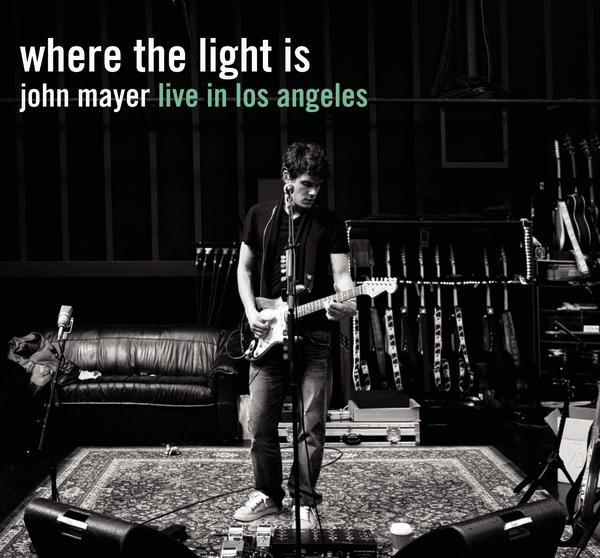
Also definitely get yourself a copy of his superb concert movie DVD "Where the Light Is" and watch and listen to it.
There is also a double CD available with a four and a half star rating on Amazon.com from 77 very impressive reviews.
Tracklisting for "Where the Light Is" DVD :
1.Neon (Acoustic Set) 2.Stop This Train (Acoustic Set) 3.In Your Atmosphere (Acoustic Set) 4.Daughters (Acoustic Set) 5.Free Fallin’ (Acoustic Set) 6.Everyday I Have the Blues (Trio Set) 7.Wait Until Tomorrow (Trio Set) 8.Who Did You Think I Was (Trio Set) 9.Come When I Call (Trio Set) 10.Good Love Is On the Way (Trio Set) 11.Out Of My Mind (Trio Set) 12.Vultures (Trio Set) 13.Bold As Love (Trio Set) 14.Waiting On the World to Change (Band Set) 15.Slow Dancing In a Burning Room (Band Set) 16.Why Georgia (Band Set) 17.The Heart of Life (Band Set) 18.I Don’t Need No Doctor (Band Set) 19.Gravity (Band Set) 20.I Don’t Trust Myself (With Loving You) (Band Set) 21.Belief (Band Set) 22.I’m Gonna Find Another You (Band Set)
So may I suggest that you may like to get some Mayer into you.
This site has a virtual guitar to show the chord, and if we click the chord or the "Strum" button,it will play the chord for us. This is good for listening to different chord inversions. The sound quality as well as the colors and graphics are well done and very user friendly.
Another good site is "Chordie" at: http://www.chordie.com/chords.php which has a printable set of standard box shaped chord diagrams in root position.
On the Chordie webpage, we can then click on a chord such as the "A" chord, and it will then show in a new window the variations of this chord all along the fret board.
A third Chord Site which is quite good is"Chord Find" at http://chordfind.com/ which has a guitar neck that shows us the chord. We can also play the chord with a midi button that starts up Windows Media Player to download and play the sample.
Click the chord you want and it puts it on the fretboard picture; then clicking “variations” button will show the chord all along the neck in different positions. We actually see a guitar neck and frets, rather than just a box diagram.
Chord Progressions
Once we know a few chords, we need to learn about how to put them together in groupings that sound good when played one after each other. This is called making a "Chord Progression".
And now a 4 minute YouTube video about putting together some blues chord progressions:
And finally as featured on a previous post, there is "The Progressionator" that will help us make progressions in different keys, by telling us what chords to use.
There is also the "Progressionator" that can be used online for free, and will supply chord progressions and rythms for the standard patterns listed.
AC/DC - Now there's some very nice powerful rock music.
We can get a bit of power into our own guitar by using "Power Chords". There is plenty of information about these chords on the internet, and here is Passy World's pick of some good material to aid your guitar education.
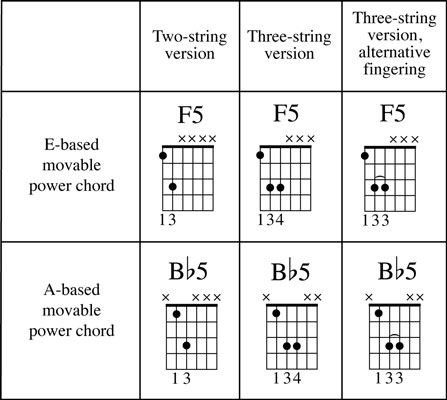
Power Chords are basically 2 or 3 notes that have been taken from a barre chord, and are played as a group on electric guitar, with distortion or overdrive liberally applied. They are the basis of many rock songs, and musically they are based on 5th intervals.
Here is an 8 minute movie from YouTube about the basics of Power Chords:
Whenever I use Itunes, or Creative Media Player, or Winamp, to play an audio CD or any MP3 files, on my computer at home, a "Gracenote" icon briefly appears on the screen, and instantly all of the artist and track information appears displayed in the media player.
I have been amazed by what Gracenote can identify. Any CD that is placed into the home PC is usually fully identified, even Hal Leonard CD's that accompany learning guitar books are fully detailed with all track names. The other amazing thing is the speed at which Gracenote links to the internet and completes this task.
I have been wondering for a while what exactly Gracenote is all about, and so I decided to research this matter further.
Here is information about the Gracenote music identification process from the Gracenote website at : http://www.gracenote.com .
Gracenote "MusicID" is the industry standard for digital music identification for both CDs and individual music files.
Gracenote MusicID® provides fast, accurate, and reliable music-related content for people all over the world. Gracenote's technology is relied on by many of the world's leading consumer electronic devices and media software applications. Gracenote MusicID uses a multi-step recognition method to enable identification, categorization, and organization of digital music. Regardless of source or format, Gracenote® gives music fans the tools to manage and enjoy their music collections.
As of 2009, Gracenote databases held information on nearly 100 million audio tracks and more than a million videos.
The Gracenote Media Database supports both networked and embedded applications for the home, car, portable, and mobile phone markets. It's the world's largest global media database of music and video metadata.
Gracenote pioneered CD recognition technology in 1995 under the name CDDB®.
In addition to the original audio CD track and artist recognition services, Gracenote now also provides:
MusicID File (Search by File Fingerprint) - A digital audio file tagging service that computes an acoustic fingerprint for MP3 and other audio files and matches it against a fingerprint database.
MusicID Stream (Search by Audio Fingerprint) - Similar in concept to MusicID File, this service computes a more robust acoustic fingerprint in order to identify a song by listening to a sample anywhere in the middle.
VideoID DVD, VideoID Blu-Ray, VideoID File - The video counterparts to the audio services for obtaining meta-data about a disc or TV episode. Like music CDs, table of contents data are used to identify DVD and Blu-ray discs, and a video fingerprint is used to identify video files.
There is a good interview with one of the founders of the original Gracenote company at this address:
Winamp runs Gracenote, connecting to the Internet, and performs a search whenever we put a CD into the PC. For example, here are the results for an Aerosmith compilation CD that I made for driving in the car. (Yes I do own all the original CDs, as I quite like Aerosmith).
Gracenote "Lyrics to Go"
Gracenote "Lyrics to Go" is a web page widget that puts a search engine onto our blog or web page like the one shown below:
Try out a search in the above window by typing in "fire in the sky" and clicking the search button. ("Smoke on the Water" by Deep Purple should be found, along with several other songs that also contain these same words).
If we then click on the "Smoke on the Water" song title that is displayed, a new window will open that will contain the full set of lyrics to the song.
With Gracenote's Lyrics To Go search widget, we have instant access to the world's largest legal database of lyrics. It's simple to implement onto any webpage and lets users search by Lyric Text, Artist Name, or Track Name.
Lyrics to Go is a great way to identify a song's title and Artist, if we only know a few of the words to a song. This is often the case where we might have heard a great song on the car radio, but can only remember the chorus line.
For example,typing in "get your motor running" soon brings up: "Steppenwolf - Born to be Wild", as well as the lesser known : "Shasta Beast - Eagles of Death Metal", which also contains these exact same words.
If we cannot find the lyrics we need using Gracenote, another great site for song lyrics can be found at: http://www.lyricsmode.com .
Gracenote Music Map
There is also the Gracenote "Music Map" http://www.gracenote.com/map/ that shows what music is currently popular in different countries and states anywhere around the world. Click a country on the map below, and then scroll to the right to see the current Top 10 Artists and Albums. (Or use the link above to go to full page view).
For example here are the results of a recent check of the latest Top 10 Artists and Albums in Iceland :
So where ever you are in the world, Gracenote is there to help guide your musical journey.
It has quite a few nice guitar learning tools, that have all been created using Adobe Flash. Some are for free, but the others require a monthly membership fee.
A cut down version of their full Tabulature writer is also supplied on the site, and shown below:
We can click on the guitar fretboard where the notes are that we want to play, and then it will write the tab for the notes underneath on the six string lines.
Try it out by clicking on the fretboard above.
A really nice thing is that once the current tabline is full, we can highlight it, and use Ctrl-C to copy it into memory. We can then Ctrl-V paste it into Notepad, and save the tab for later printing. We can clear the tabulator, continue the tab, and then copy and paste this into our notepad document. So it is indeed a very user-friendly tab writing tool.
There is also the "Progressionator" that can be used online for free, and will supply chord progressions and rythms for the standard patterns listed.
Try it out below: (Note that you may have to use the scroll bars get it into view). or you could just click this link: http://www.hotfrets.com/songanator.asp
There is also the "Arpeggiator" that can be used online for free, and will supply all of the notes that make up a particular chord. The notes are shown on the neck, and can be plucked with the mouse pick.
The advanced metronome is almost like a mini online drum machine.
The Guitar Tuner, Tab Writer, Progressionator,and how to play songs items at hotfrets have all been created using Adobe Flash. I show them to my computing students as examples of the extent of the power of Flash.
Music naturally runs in a timeline when it plays, and so Flash is well suited for graphically representing music and translating it to Guitar tabulature.
The magnificent Jimi Hendrix, a bit before my time, but undoubtedly one of the best guitarists to ever lay down blues derived music on an electric guitar.
Okay, so this blog post is not directly ICT related; however it does review some excellent learning material that is available on the internet for guitarists.
So if you don’t like Guitar, then perhaps totally skip reading this post.
The sample videos shown here, are all by a guy called “Marty”, who is a great practitioner and teacher of blues guitar. He even looks a bit like he is Billy Joel’s younger brother !
Part of the purpose of making these You Tube videos seems to be to advertise what is available at the “Next Level Guitar” website. (More on that a bit later on).
Here is an 8 minute video that explains how Jimi Hendrix added inversions of common chords to his guitar playing to create a new and distinctive style of guitar songs.
The next video is really good for beginner guitarists, as it shows very clearly blue improvisation methods on the guitar. Marty takes things nice and slow so we can all easily understand what is going on.
The following is an 11 minute video all about how to play BB King style. Marty shows how to mix in major scales to create the classic signature "sweet" sound of the legendary BB King.
There are a few more videos on You Tube by Marty, but as his final one for this post, here is a 10 minute video about Blues Acoustic Guitar that shows some great forms of the A7 chord all the way up past the 12th fret.
The “Next Level Guitar” website is a comprehensive online learning resource for guitarists. It is a bit like a “Lynda.com” of guitar lessons. (Lynda.com provide a comprehensive range of computer software tutorials for Microsoft, Adobe, and many other applications).
On the top of page Index tab, we can click on “Free Videos”, and there are around 40 videos that can be viewed. Some of these videos, are merely previews of parts of DVD’s that they have available for sale elsewhere on their website. These DVD’s look to be quite good. Typically they cover just one classic guitar song like Hendrix’s “Hey Joe” or Deep Purple’s “Smoke on the Water”. The DVD then spends two hours showing every single part of the song, and how to play it. These DVD's seem to retail for around $25 US each, which is not a bad price, considering it is going to be at least a full day’s entertainment working through the DVD learning the song.
Note that while viewing the free videos: If we double click on any video while it is playing we get taken to Metacafe, and can see and find even more videos that we can watch about playing guitar that have been made by the folks at “Next Level Guitar”.
You can also become a premium member of their website for less than $30 US per month. This membership obtain access to a range of beginner, intermediate and advanced guitar playing courses. These courses have their videos for viewing online, and include downloadable resources, such as music backing tracks.
I am thinking on perhaps trying out the online membership for a month later on this year. If I do, rest assured I will do a comprehensive blog post review about it.
Hoping your blues is only of the guitar playing kind.
So what is this blog post all about ? After all, electric guitars were around well before personal computers. So what has all this got to do with ICT ?
Well the point I am trying to make here, is that no matter what your passion, or whatever the task you need to perform, then You Tube probably has the answers.
So for anyone out there who loves the Fender Stratocaster style of guitar; here are some useful ways to ensure your guitar is setup for optimal playing performance.
String Height (“Action”) Adjustment:
Stratocaster "Truss Rod" Adjustment:
On a Strat, it is a solid bar that goes through the whole neck. It controls the arc that the neck has. Often necks have a little bit of curvature along them.
Setting the Intonation (12th fret tuning):
Hope you find this information to be "finger picking good" !
Here is a Wall Wisher for the second half of Algebra, which is all about Factorisation of Polynomials. As usual the wall has plenty of videos, and website links that were found by quite a bit of searching Google and YouTube.
If you would like to view the wall full size, then click the link below.
One of the interesting things while building this wall, was finding the following collection of guitars from the John Richardson Band. (From the photos on their website, these guys look like they have been around for a while). http://www.johnrichardsonband.com They sure know how to choose great guitars. The photo of their axes below (along with the amps) is probably the ultimate dream collection for any guitarist.
The classic smooth parabolic curves of the Fender Stratocaster, are a sight that this mathematician always finds aesthetically pleasing.
I have not made any PowerPoints for Factorisation yet, as I plan on using the "Cross Method" to do most of the trinomial work by hand on a whiteboard. We also need to do Greatest Common Factor, which I plan to do using Factor Trees.
It will be a challenging unit, as Algebra is always difficult for most students.
Click on the 128K windows media symbol to listen to any of the online radio stations on the above menu. But if you want to open the 1.FM website full size in a new window, then click on the 1.FM logo below.
1.FM at http://www.1.fm is in my opinion the world's best internet radio station. As shown below, there is a wonderfully diverse range of radio stations in the 1.FM family.
as well as these stations:
Listening is available in streamed Windows Media Player 128K format, and others, as shown above. WMP 128K gives great quality sound when put through some decent PC speakers like Creative T-20's or T40's. There is also mobile phone access, as described in the "Mobile" section of the site.
Here is a quick review of some of the stations available.
Otto's Baroque Classical Music This station has wonderful violin and chamber orchestra music, as shown in the screen capture below.
Bay Smooth Jazz Great laid back Jazz Fusion music. Pleasant for background music while working away on other things.
Power Rock As the name suggests modern heavy guitar music, for lifting your energy levels in an active kind of way.
There are plenty of stations for all tastes and musical genres.
1.FM's main role is to broadcast a full range of music styles. However, their website also has a photo gallery, as well as a nice Videos section which has good comedy videos.
Take some time out to explore 1.FM and I am sure you will not be disappointed.